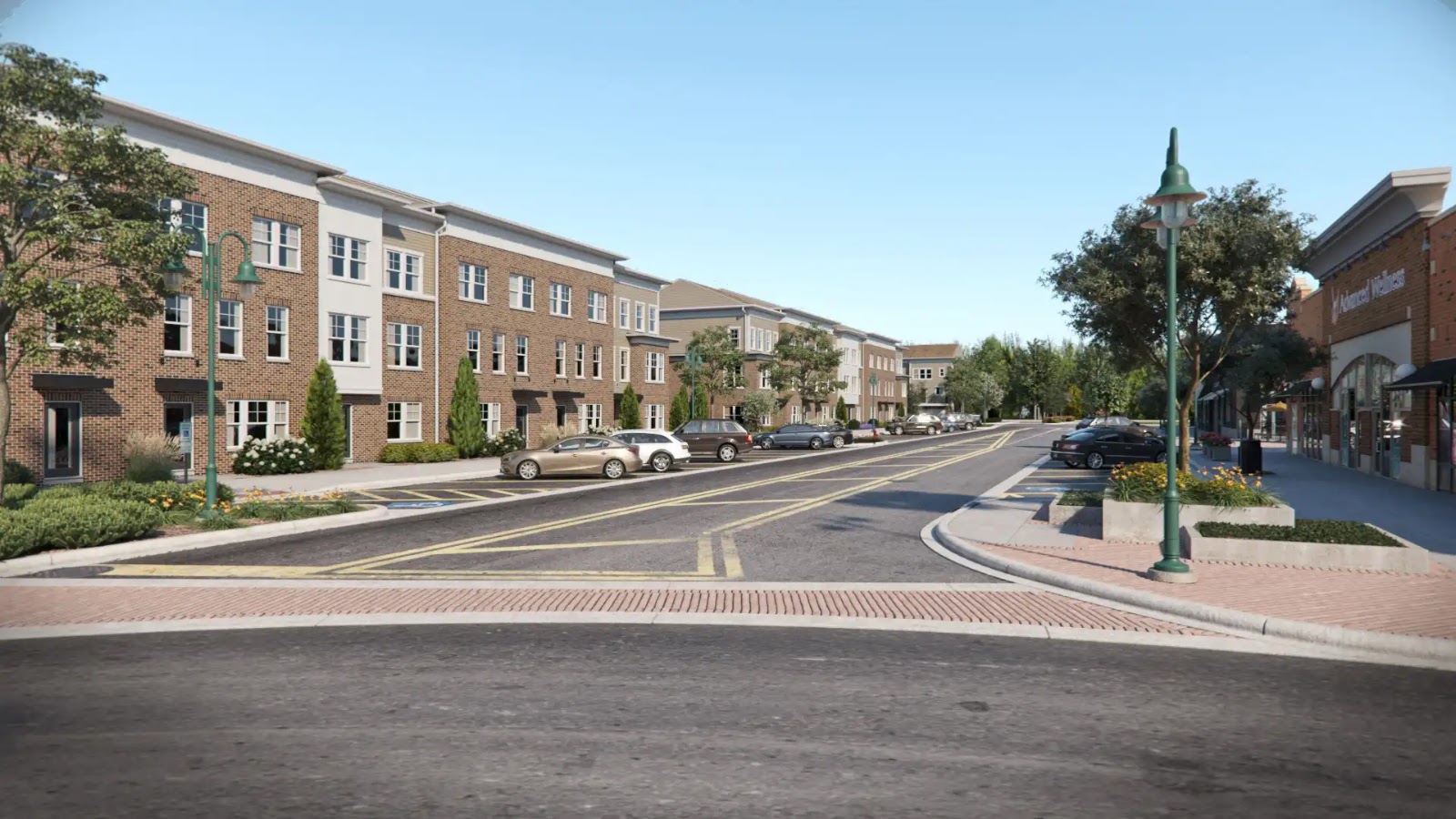
Q4 multifamily marketing visuals should start with a practical asset checklist: where each image, floor plan, tour, or presentation graphic will be used; what each channel requires; which drawings and finish decisions are current; who approves the work; and what can realistically be produced before year-end deadlines. That order keeps the conversation tied to usable leasing materials instead of a vague request for “a few renderings.”
The complication is that year-end campaigns often move faster than project documentation. A property may be under construction, a repositioning may still have open finish decisions, or a leasing team may need website, listing, email, social, print, and deck assets from the same base imagery. The sections that follow organize the work around channel needs, source files, project stage, view planning, delivery risks, and approval rules.
Table of Contents
- Start With the Q4 Multifamily Marketing Asset Checklist, Not a Generic Rendering Request
- What to Gather Before Visual Production Starts
- Choose the Right Visual Package for the Project Stage
- Plan the Views and Exports Around Leasing Use
- What Usually Slows Q4 Delivery or Creates Rework
- Set the Approval, Compliance, and Timeline Rules Before the Deadline Pressure Hits
- FAQ
- What to Do Next?
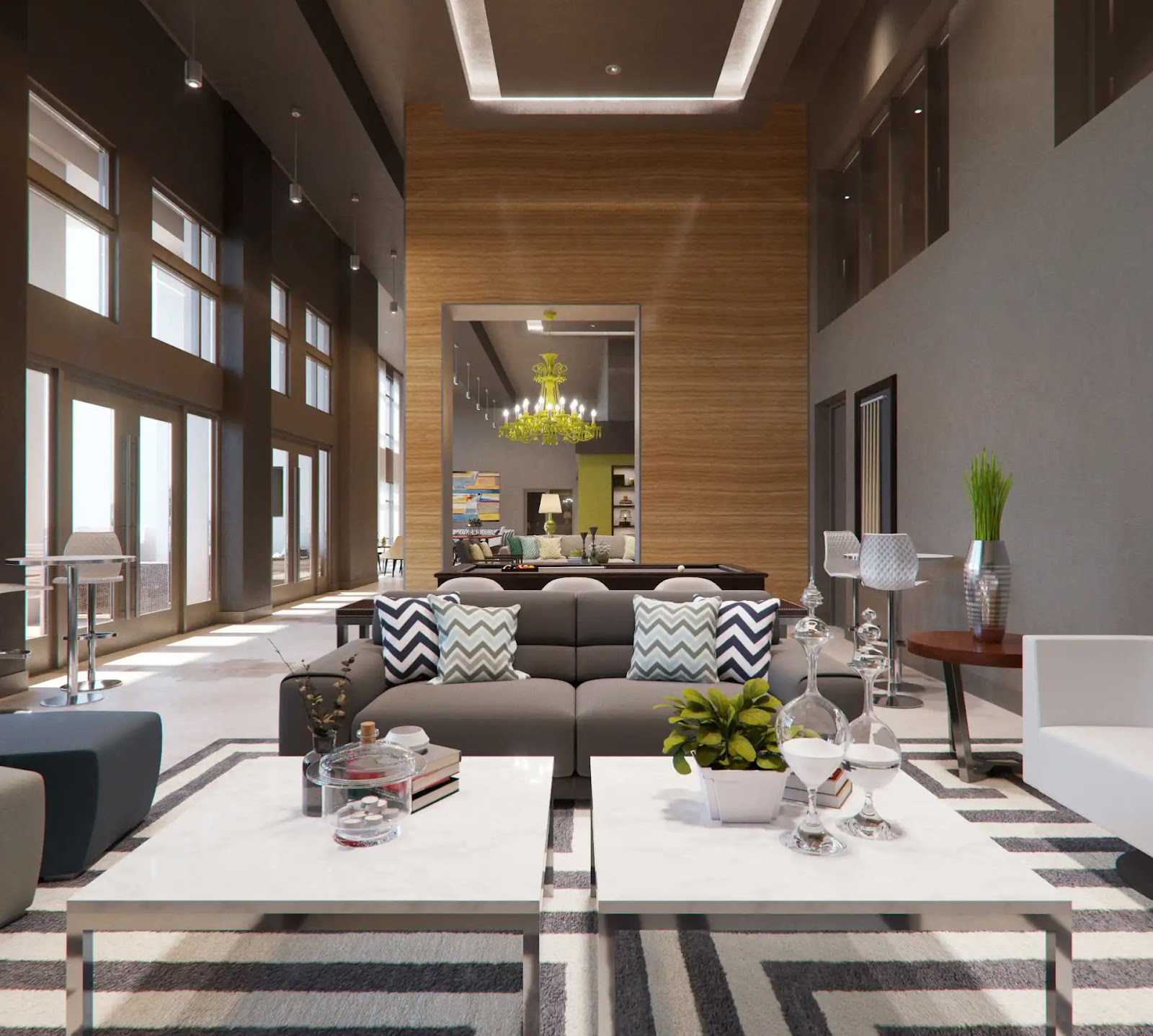
Amenity Lounge
Assess Seating Layout and Window Placement
The lounge layout, furniture grouping, and daylighting support leasing conversations about resident-facing amenities.
Start With the Q4 Multifamily Marketing Asset Checklist, Not a Generic Rendering Request
The first useful question is not “How many renderings do we need?” It is “Where will each visual be used, and what does that placement require?” A website hero, listing gallery, paid social ad, email header, printed brochure, leasing deck, out-of-home placement, and virtual tour all place different demands on the same property story.
For Q4 multifamily marketing, that means the visual brief should read more like a deliverables table than a mood board. Each row can name the deliverable, intended use, source inputs, required format, approver, due date, and acceptance criteria. This keeps production tied to a real campaign need and gives the team a shared way to decide whether an image is finished enough for use.
A simple checklist might include:
- Listing images for current or upcoming availability
- Website hero images and supporting gallery images
- Paid social crops in the required orientations
- Email header or campaign images
- Leasing deck images for tours, brokers, ownership, or internal review
- Brochure, print, or out-of-home graphics if those placements are part of the campaign
- Floor plan graphics by unit type
- Virtual tour, 360, or panoramic media if the campaign needs interactive content
This approach also prevents one of the most common Q4 problems: approving a single attractive exterior image and later discovering it does not crop well for social, does not fit the website module, is not prepared for print, and cannot support the listing gallery. A strong master image can be useful, but final campaign files usually need channel-specific crops, formats, color preparation, or file-size checks.
Exact platform specifications can change, so confirm the current requirements for the actual placements before production starts. The visual team does not need every marketing detail at first, but it does need to know whether the final use is digital, print, listing, paid media, presentation, signage, or tour content.
What to Gather Before Visual Production Starts
Leasing visuals are only as dependable as the information behind them. Before visual production starts, identify the authoritative source for the property layout, unit mix, amenity planning, exterior massing, and current design decisions. If several plan sets are circulating, the team should know which one governs the work.
Useful inputs often include current floor plans, amenity plans, exterior elevations, reflected ceiling plans, and BIM or CAD exports when available. BIM/CAD files are helpful for model-based accuracy, but they are not always mandatory. Some early visuals, floor plan graphics, or concept-level studies may proceed from 2D plans or other source material, depending on the required level of accuracy.
Interior renderings need more than geometry. They need a finish schedule and enough FF&E direction to avoid guesswork. Flooring, cabinetry, counters, wall finishes, plumbing fixtures, lighting, furniture, art, plants, and amenity styling all affect the image. If those decisions are still open, the brief should acknowledge that uncertainty rather than presenting the space as fully resolved.
Unit mix also matters. A campaign may not be served by one beautiful model-unit image if the property needs to explain studios, one-bedrooms, two-bedrooms, penthouse layouts, townhome units, or accessible unit types. Leasing teams should decide which layouts need representation and which can be handled through floor plans rather than full renderings.
For exteriors and site-related views, context materials can reduce assumptions. Site photos, neighboring building references, streetscape images, signage direction, landscape plans, and arrival sequence notes help clarify how the property sits in its surroundings. For a repositioning, existing-condition photos may be as important as new design drawings because they show what remains and what changes.
When the deadline is tight, separate inputs into “essential now” and “helpful later.” Essential-now items are the documents and decisions required to make the current deliverable credible. Helpful-later items may refine the work, but they should not stop a simpler asset if the campaign needs an earlier concept image or floor plan graphic.
Choose the Right Visual Package for the Project Stage
The right visual package depends on what is confirmed, what is still moving, and what the campaign has to explain. A conceptual project should not be treated the same way as a nearly complete property with photographed finishes. A repositioning with active construction has different needs from a stabilized asset refreshing its leasing materials.
Early projects may be better served by stylized exterior views, massing images, simple amenity concepts, or clean floor plan graphics. These can help communicate direction while leaving room for design development. If finishes, lighting, and furniture are still undecided, pushing for fully detailed interiors can create revisions that are more about missing information than production quality.
Well-documented projects can usually support more exact renderings because geometry, materials, and design intent are clearer. Current Revit models, DWG files, finish schedules, elevation drawings, landscape references, and coordinated interiors make it easier to create images that match the project team’s expectations. Even then, the team should confirm which design decisions are final enough for public-facing use.
Under-construction or repositioning campaigns often need a mixed package. Photography may show completed areas, existing neighborhood context, a finished lobby, or authentic material conditions. Renderings can fill the gaps for future-state amenities, unfinished units, exterior improvements, or spaces that will not be ready before the campaign launch.
Near-completion campaigns may lean more heavily on photography when the finished property itself is the proof point. Renderings can still be useful for spaces not yet accessible, alternate unit types, planned amenity upgrades, or future phases. The decision is not renderings versus photography as a rule. It is whether the campaign needs to show what exists, what is coming, or both.
Photorealism also has a practical tradeoff. More detailed imagery usually needs more confirmed information and more careful review. If the Q4 deadline is close and design certainty is limited, a narrower package with fewer, better-supported views may be more useful than a broad set of images built on assumptions.
Free Guide
Plan Better Renderings Before Your Next Presentation
Use this quick guide to prepare clearer visual direction before project meetings, marketing reviews, or stakeholder presentations.
- Clarify the views your team needs before rendering starts
- Compare exterior, interior, and amenity visuals with more focus
- Prepare stronger notes for design, leasing, or marketing discussions
A practical checklist to help your team prepare.
Plan the Views and Exports Around Leasing Use
Once the asset type is clear, the next step is the view list. A good view list is not simply a list of the prettiest spaces. It should be tied to what prospects, leasing teams, ownership, brokers, or internal decision-makers need to understand.
Typical multifamily priorities may include a hero exterior, street-level arrival, aerial or context view, lobby, clubroom, fitness amenity, pool or roof deck, co-working area, representative unit types, and floor plans. Not every property needs all of those. An unbuilt property may need future-state exterior and amenity renderings. A repositioning may need before-and-after clarity. A stabilized property may need updated unit photography and cleaner floor plan graphics.
Prioritize spaces that affect leasing conversations. If one unit type drives the leasing push, it may deserve more attention than a secondary amenity image. If the arrival sequence is hard to explain from the street, a hero exterior or street-level view may matter more than another interior vignette. If a campaign depends on paid social, the view needs to read quickly in a small format, not only in a full presentation deck.
Exports should be planned at the same time as views. A landscape image for a website hero may need a different crop than a portrait ad, a square carousel image, or a printed brochure panel. If out-of-home or print is included, the team may need separate file preparation from web graphics, including different color handling or resolution expectations. Those requirements should be verified for the actual vendor or placement.
Virtual tours and 360 media should be scoped separately. They are not just still renderings repackaged into another folder. Tour platforms may require panoramic media, specific naming, clear viewpoint sequencing, and a different review process. If a leasing campaign needs tours, the production plan should identify those requirements early rather than treating them as a late add-on.
Version naming sounds mundane, but it matters in Q4. When one base exterior view becomes several channel exports, unclear filenames can create confusion. Naming by property, view, unit type, channel, date, and revision helps reduce the risk of publishing the wrong file.
What Usually Slows Q4 Delivery or Creates Rework
The first delay is undefined channel use. A request for “marketing renderings” can mean very different things to ownership, leasing, the architect, and the marketing director. If the final placements are not known, the team may approve an image that looks strong in review but fails in the actual ad, listing, or website format.
The second delay is inconsistent source information. Outdated plans, conflicting drawing dates, unresolved unit layouts, and unconfirmed amenity geometry can all trigger rework. If ownership is reviewing one plan revision, the architect is referencing another, and marketing has an older PDF, comments can become disputes about the source of truth rather than helpful visual feedback.
The third delay is starting detailed interiors before finishes and staging direction are ready. Interior amenity images are sensitive to flooring, counters, cabinetry, lighting, furniture, art, and brand tone. If the approved finish palette changes after production starts, revisions may affect materials, mood, furnishings, and the way the space is presented to prospects.
The fourth delay is assuming one final export works everywhere. A wide exterior rendering may be excellent for a website but weak as a vertical social placement. A detailed amenity image may work in a brochure but lose clarity as a small ad. Planning crops early is usually easier than trying to rescue a composition after approval.
The fifth delay is vague approval responsibility. Multifamily visuals often pass through ownership, asset management, architecture, interiors, construction, leasing, and marketing. All of those groups may have useful input, but the process needs one accountable approver per deliverable. Otherwise, late comments can contradict earlier direction or reopen decisions that the schedule cannot absorb.
Set the Approval, Compliance, and Timeline Rules Before the Deadline Pressure Hits
Q4 schedules should be planned backward from the real date that matters: leasing launch, paid campaign launch, broker presentation, ownership review, board meeting, listing update, brochure release, or year-end reporting deadline. The schedule also needs room for input collection, first review, consolidated comments, revisions, export preparation, and release checks.
A practical review structure can stay lightweight. For each deliverable, name the owner, the accountable approver, the people who contribute comments, and the date decisions are due. This can be a simple RACI-style table without turning the visual brief into a heavy process document. The point is to make signoff clear before the pressure arrives.
Comments should be consolidated before they are sent back for revision. Separate review threads from ownership, leasing, the architect, interiors, and marketing can create duplicated or conflicting direction. A single marked-up PDF, annotated image set, or organized comment log is usually easier to act on than scattered emails.
Public-facing multifamily materials also need usage and review checks. Confirm that image licensing or usage rights cover the planned placements, such as website, listings, paid ads, social, print, out-of-home, leasing presentations, or investor decks. The team should also consider fair-housing review, listing-policy requirements, and internal advertising standards where applicable. Visuals alone do not make a campaign compliant; they are one part of the broader marketing material.
Finally, keep the production scope realistic. A smaller set of well-briefed views with clear approvals may serve a Q4 deadline better than a larger package that depends on unresolved finishes, missing plans, or unclear channel specs. The most useful visual plan is the one that matches the campaign’s actual placements, the project’s current certainty, and the team’s ability to review on time.

Aerial Amenity View
Assess Community Layout and Amenity Placement
Compare how the residential buildings and central pool are organized across the site.
FAQ
What files do you actually need to start Q4 multifamily marketing visuals?
Start with the authoritative plans: current floor plans, unit plans, amenity plans, and elevations. Add BIM or CAD exports when available, plus finish schedules, unit mix, FF&E or staging direction, site and context photos, and site access information. If not everything is final, separate the inputs required now from items that can refine later versions.
Can one rendering package be used for listings, social ads, email, and the website?
A shared source package can help, but final files usually need channel-specific crops, ratios, formats, and file-size checks. Website heroes, listing galleries, social placements, email headers, print pieces, and out-of-home graphics often require different export preparation. Virtual tours and 360 media should be scoped separately.
Should a multifamily project use renderings or photography for a Q4 campaign?
It depends on project stage and campaign purpose. Use renderings when the property is unbuilt, under construction, being repositioned, or not ready for photography. Use photography when the finished property is presentable and authenticity is the priority. Many Q4 campaigns use a mix of both.
How early should Q4 leasing visuals be planned?
Plan backward from the campaign, leasing, approval, or year-end date. Include time for gathering inputs, production, review rounds, revisions, channel-specific exports, and release checks. Avoid relying on a universal lead time because scope, documentation quality, asset count, review speed, and vendor capacity can all change the schedule.
Who should approve leasing visuals when ownership, marketing, and the design team all have input?
Assign one accountable approver per deliverable, while allowing other stakeholders to feed comments through a defined review structure. This keeps ownership, leasing, architecture, interiors, and marketing involved without creating conflicting late-stage direction.
Free Guide
Plan Better Renderings Before Your Next Presentation
Use this quick guide to prepare clearer visual direction before project meetings, marketing reviews, or stakeholder presentations.
Prefer to talk it through? Email us at info@rmdesignstudio.com or call 630.540.1222.
What to Do Next?
Turn the planning into a working visual brief. List every Q4 placement that needs imagery, floor plans, tour media, or presentation graphics. For each one, note the intended use, required output type, source files, approver, due date, and acceptance criteria.
Then choose the minimum useful asset package for the project’s current stage. A conceptual project may need floor plans and selected exterior views. An under-construction property may need future-state renderings for unfinished spaces and photography for completed areas. A near-complete property may need more photography, with renderings used only where construction or access still limits the campaign.
Before production begins, gather the current plan set, finish schedule, FF&E direction, unit mix, site references, and channel requirements in one organized handoff. Flag unresolved decisions that could affect accuracy, realism, usage rights, fair-housing review, listing policies, or release timing. That preparation gives the team a clearer path through Q4 without turning every missing detail into a late revision.