
A Q4 real estate marketing strategy should start with the visual material that has to be ready before the year-end push: hero exterior renderings, a few key interiors, floorplans, site-context imagery, and only selective motion or interactive content when the schedule supports it. For developers, leasing teams, architects, and ownership groups, the practical question is not simply what to show. It is what can be briefed, reviewed, exported, and used across campaign channels before the calendar closes.
The right package depends on the campaign objective, the project stage, the available drawings or models, and the channels that need final files. A pre-launch multifamily project may need CGI and floorplan PDFs, while an active development may also benefit from progress photography and an aerial context view. The sections that follow focus on asset priorities, source information, review timing, export requirements, and the avoidable mistakes that often create late rework in fourth quarter real estate marketing.
Table of Contents
- What a practical Q4 real estate marketing strategy includes
- How to choose the right assets for your campaign objective and project stage
- What needs to be locked before visual production starts
- How far ahead to plan Q4 renderings, animation, and review cycles
- Which file formats and export versions to confirm before final delivery
- The Q4 mistakes that cause the most avoidable rework
- FAQ
- What to Do Next?
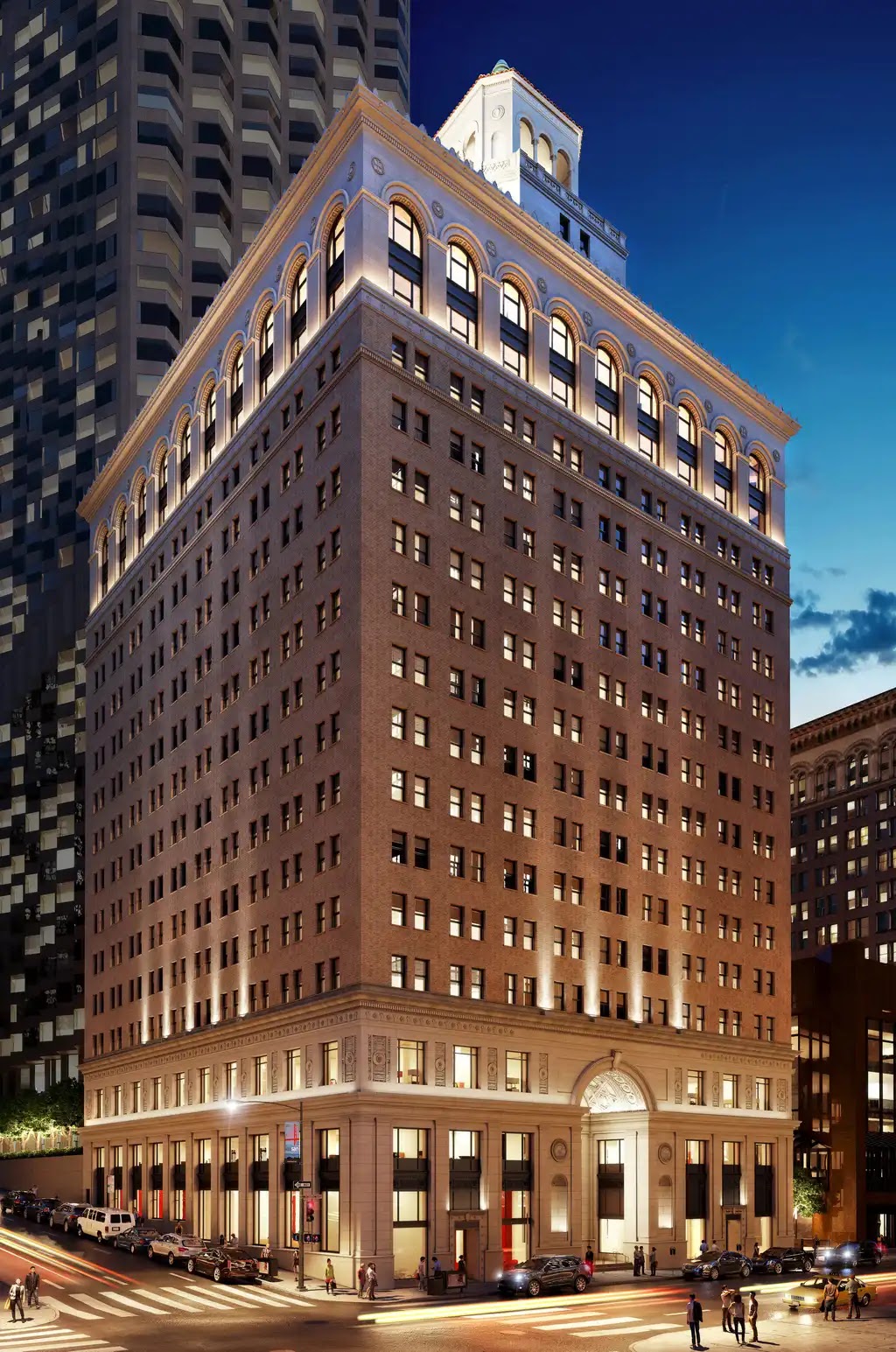
Historic Exterior
Assess Dusk Lighting and Street Presence
Examine how the restored facade reads against the skyline at dusk.
What a practical Q4 real estate marketing strategy includes
A practical Q4 package usually begins with a small group of high-use assets rather than a long content wish list. For many developments, that means one or more hero exterior renderings, one to three key interior views, current floorplans or floorplan PDFs, and a site-context image that explains location, access, adjacency, or neighborhood position. If the property is active on site, construction progress photography can also help keep updates current before final photography is possible.
The hero exterior view is often the anchor because it can support a website refresh, leasing deck, investor update, brochure, email header, or construction fence graphic. A dusk variation can be useful when it strengthens the campaign mood or highlights lobby lighting, frontage, signage, or arrival experience. It should not be added simply because it sounds seasonal. Every added view creates another item to brief, review, revise, and export.
Interior views should be chosen around the spaces that matter most to the audience. A leasing campaign may need a living area, kitchen, amenity room, model unit, lobby, or shared workspace. A sales-led campaign may need the spaces that explain finish level, layout, views, or daily use. The point is to avoid random room selection. Each interior rendering should answer a buyer, tenant, investor, or reviewer question that a plan alone cannot answer.
Animation, 360 tours, VR, and interactive assets can be useful, but they are not the baseline requirement for every fourth quarter campaign. They usually need more time, more resolved information, and tighter review control. If the launch date is close, a focused still-image package with correct export versions may be more realistic than a late attempt to add motion.
How to choose the right assets for your campaign objective and project stage
The asset mix should follow the immediate use case. A leasing team usually needs unit interiors, amenity views, floorplans, and listing-ready image versions. A sales launch may need a stronger sense of arrival, interior finish, lifestyle context, and neighborhood position. An investor or ownership update may rely more on aerial context, massing clarity, progress imagery, and visuals that explain what has changed since the last reporting period.
Project stage matters just as much as campaign objective. A pre-launch project depends more heavily on CGI, plans, and carefully selected context imagery because the building is not yet photographable. An under-construction project can combine renderings with repeatable progress photography from comparable angles. A near-complete or existing property may shift part of the package toward real photography, while still using CGI for future phases, unbuilt amenities, or alternate finish options.
A focused package often serves a Q4 campaign better than broad coverage. If the team tries to produce every possible view, review attention gets diluted and unresolved decisions surface late. A smaller set of hero exterior, key interiors, floorplans, and context imagery gives the team a clearer path to approvals and final exports. It also makes it easier to decide which assets can support several channels without pretending one file will automatically suit every use.
When priorities conflict, start with the next decision moment. If the next priority is a leasing push, floorplans and unit views may matter before a long animation. If the next priority is an ownership update, a current site photo set and aerial context may be more useful than a furnished amenity rendering. If the next priority is a public-facing launch, the exterior hero and arrival sequence may need to be settled first.
What needs to be locked before visual production starts
Visual production depends on more than a general design direction. Before final rendering begins, the team should gather approved architectural plans, BIM or CAD exports where available, current floorplan PDFs, massing information, and any drawings that clarify facade, roofline, site, or interior relationships. If the design is still moving, that does not always prevent work from starting, but provisional information should be identified clearly so everyone understands the revision risk.
Materials and finish schedules are especially important for Q4 production. Facade cladding, glazing tone, brick color, metal finish, flooring, cabinetry, counters, lighting temperature, furniture direction, and landscape intent can all affect final images. When these items are unresolved, the rendering team can make assumptions, but those assumptions may need to be changed across multiple camera views. Late finish changes are rarely isolated to one file.
Views should also be chosen deliberately. Exterior cameras might focus on arrival, frontage, skyline relationship, pedestrian scale, amenity access, or a corner condition that helps explain address and visibility. Interior cameras should focus on spaces that support a specific decision: a kitchen that clarifies finish level, a living area that explains daylight and layout, a lobby that sets the arrival tone, or an amenity space that helps leasing teams describe resident experience.
Review authority should be defined before production starts. The architect may need to approve design accuracy, the developer may need to approve investment narrative, and the marketing team may need to approve campaign fit. Those are related, but they are not identical. Separating design-accuracy review from marketing review can reduce contradictory comments and keep late revisions from reopening choices that should have been settled earlier.
Free Guide
Plan Better Renderings Before Your Next Presentation
Use this quick guide to prepare clearer visual direction before project meetings, marketing reviews, or stakeholder presentations.
- Clarify the views your team needs before rendering starts
- Compare exterior, interior, and amenity visuals with more focus
- Prepare stronger notes for design, leasing, or marketing discussions
A practical checklist to help your team prepare.
How far ahead to plan Q4 renderings, animation, and review cycles
Q4 planning works best when the team starts with the campaign launch date and works backward. The calendar should include briefing, source file collection, early proof review, material and color review, final delivery, and export variants. The rendering itself is only one part of the schedule. Input readiness and approval speed often have as much influence on delivery as the number of images.
A small still-rendering package may be feasible within days to a few weeks once the model, views, materials, and brief are ready, depending on scope and review rounds. Larger still packages need more time because each view introduces its own composition, detail, and export requirements. Animation, flythroughs, or interactive work should usually be planned earlier because camera paths, scene transitions, model optimization, music, titles, or platform requirements add coordination.
For a 60 to 90 second animation, teams should treat the effort as a several-week production item rather than a last-minute add-on. Exact timing varies by model quality, design complexity, revision rounds, approval speed, and studio capacity. If a marketing director wants motion two weeks before a year-end launch, a shorter sequence, a still-image package, or a phased campaign may be more realistic than forcing a large animation into a compressed window.
A phased review process helps protect the schedule. An early proof can settle camera angle, composition, massing, and broad direction. A material or color proof can confirm facade, interior finishes, lighting mood, planting, furniture, and signage assumptions. Final review should focus on finishing details and export accuracy rather than reopening unresolved design decisions. One internal review lead can gather comments from ownership, architecture, leasing, and marketing so the production team receives one coordinated response.
Which file formats and export versions to confirm before final delivery
One approved rendering can often support several channels, but it usually needs more than one final export. Website, email, social, and many listing uses commonly rely on sRGB JPEG or PNG files, but the intended platform should be checked before export. MLS boards and listing platforms may have their own rules for size, format, branding, order, or disclosure. A file that looks fine in a deck may still need adjustment for a listing environment.
Print, hoarding, and signage should be treated as separate deliverables, not enlarged web images. These uses may require CMYK preparation, print-ready PDF, TIFF, or EPS files, outlined fonts, specific scale, bleed, crop, or printer instructions. Large-format artwork also depends on viewing distance and vendor workflow, so it is safer to confirm requirements with the print operator before final delivery rather than after the campaign artwork has been approved.
Video and interactive deliverables need the same early clarification. A webinar clip, paid media cut, leasing screen loop, investor presentation, and social post may each need different aspect ratios, durations, file types, or compression settings. Interactive work should follow the target platform instead of assuming one format fits every use. GLB or glTF may be relevant in some web or AR workflows, while other pipelines may require different exports.
Editable files, layered files, source files, usage rights, and unusual export variants should be discussed in scope before production begins. Teams sometimes assume that every version will be included automatically once a rendering is approved. In practice, the useful campaign package is not only the image concept; it is the set of correctly prepared files that can move through web, MLS, decks, brochures, signage, video, and internal review without avoidable re-export requests.
The Q4 mistakes that cause the most avoidable rework
The first common mistake is waiting until Q4 to settle materials, finishes, or design direction. Some changes are legitimate and unavoidable, especially on active developments. The problem is pretending those changes have no schedule effect. A revised facade material, lobby palette, window system, kitchen finish, or landscape plan can affect several approved views at once.
The second mistake is treating animation or immersive content as a late upgrade after still images are already in review. Motion can be valuable for a launch, investor presentation, remote tour, or webinar, but it should be scoped with enough time for model readiness, camera planning, review, and platform requirements. If those pieces are not in place, adding motion late can create a larger scheduling problem than it solves.
The third mistake is using the same file assumptions for web, MLS, print, signage, and video. Each channel may need a different crop, aspect ratio, color space, file type, or compliance check. A hero rendering approved for a website may still need a separate print-ready version for hoarding, a differently cropped version for email, and a listing-compliant version for MLS.
The fourth mistake is allowing several reviewers to send separate late comments. Ownership, architecture, leasing, asset management, and marketing may all be looking for different things. Without one feedback owner, comments can overlap, conflict, or arrive after a review window has closed. A single consolidated response does not remove the need for multiple perspectives; it simply turns them into usable direction.
The final mistake is leaving rights and file expectations vague until rollout. If the team needs source files, layered files, editable formats, print-ready artwork, video intermediates, or platform-specific interactive exports, those needs should be stated before production. Q4 schedules leave little room for discovering at the end that the approved image exists, but not in the versions the campaign requires.

Urban Streetscape
Assess Street-Level Context and Mixed-Use Frontage
Study how the buildings, roadway, and active frontage read together in a dense urban setting.
FAQ
How early should a Q4 real estate marketing strategy start visual production?
Start by working backward from the campaign launch date. A small still-image package may move quickly if the model, drawings, materials, and brief are ready, while larger packages and animation usually need more lead time. Approval speed, source-file readiness, and revision rounds often affect the calendar as much as rendering complexity.
Do Q4 campaigns need animation, 360 tours, or VR?
No. Animation, 360 tours, VR, and interactive assets can be useful for launches, investor presentations, remote viewing, or webinars, but they are optional. They should be scoped when timing, budget, design certainty, and channel use support the extra production effort.
What files should a marketing team gather before commissioning renderings?
Gather approved architectural plans, BIM or CAD exports if available, current floorplan PDFs, material and finish information, selected views, context references, and any furniture or lighting direction. It also helps to identify who approves design accuracy and who approves campaign presentation.
Can the same rendering be used for MLS, web, email, and print signage?
One approved visual can often be repurposed across channels, but it usually needs separate export versions. Web, MLS, email, print, signage, and decks may have different size, color, crop, branding, or file requirements, so those outputs should be confirmed before final delivery.
What is the most useful Q4 asset if budget only allows one or two visuals?
Start with a hero exterior rendering if the campaign needs a clear public-facing image. For a second asset, choose based on the objective: a key interior view for leasing or sales presentation, a floorplan for unit understanding, or a site-context view if location and access are central to the story.
Free Guide
Plan Better Renderings Before Your Next Presentation
Use this quick guide to prepare clearer visual direction before project meetings, marketing reviews, or stakeholder presentations.
Prefer to talk it through? Email us at info@rmdesignstudio.com or call 630.540.1222.
What to Do Next?
Begin by writing down the Q4 launch date and the first campaign decision the visuals need to support. Then choose the smallest asset tier that can serve that moment: hero exterior, key interiors, floorplans, site-context imagery, progress photos, or motion only if the calendar allows it.
Gather the source material in one place before production begins. Include approved plans, BIM or CAD exports, floorplan PDFs, finish schedules, material references, selected camera views, site photography, and any known channel requirements. Mark unresolved items as provisional so review comments do not become a surprise late in the process.
Set the review structure early. Identify one feedback owner, separate design-accuracy review from marketing review, and schedule proof checkpoints for composition, materials, final details, and export variants. List every channel that needs files, including website, MLS, email, decks, brochures, signage, video, and any interactive platform, so the final package is planned around actual use rather than assumptions.