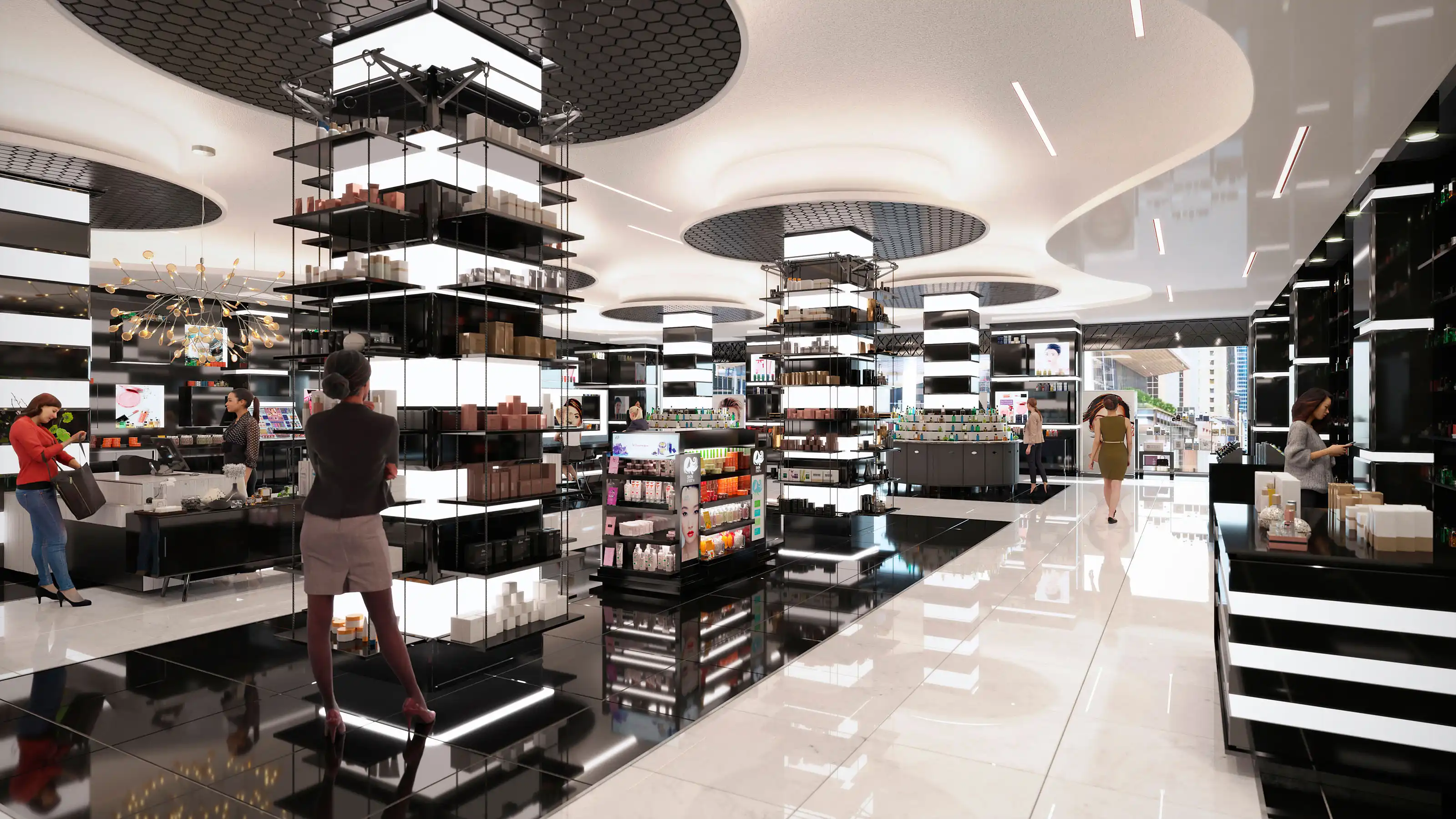
Experiential retail visualization helps a flagship or branded store concept be designed, reviewed, marketed, and sometimes shopper-tested before construction begins. It is not a single rendering product. The right format depends on the decision the visualization needs to support, the audience reviewing it, and how much realism or interactivity is actually useful at that stage.
A flagship concept may need quick mood images during early design, polished hero views for ownership or marketing, and an interactive experience only when viewer control adds something meaningful. Asking generally for renderings can lead to unclear scope, extra revisions, or paying for deliverables that do not answer the team’s real question. The sections here explain how to choose formats, prepare inputs, understand scope drivers, avoid common mistakes, and brief the work clearly.
Table of Contents
- What experiential retail visualization is actually for
- Which deliverable fits your retail objective
- What you need to provide before visualization starts
- What actually drives timeline and budget
- Where teams get experiential retail visualization wrong
- How to brief and compare vendors for a flagship retail visualization project
- FAQ
- What to Do Next?
RM Design Studio
Planning a rendering project?
Talk with RM Design Studio about your project, the views you need, and your timeline.
What experiential retail visualization is actually for
Experiential retail visualization is best understood as a decision tool for a store experience that does not exist yet. It can help a team understand a flagship store concept, a branded environment, a pop-up, a showroom, or a new retail format before money is committed to build-out, fabrication, launch content, or a broader rollout.
The first useful question is not, Do we need renderings? A better question is, Who needs to see what, and why? An internal design team may need to test the customer journey, fixture placement, sightlines, and material mood. An ownership group may need a small set of clear hero views for a board presentation. A landlord may need to understand storefront presence, signage, and how the concept fits the property. A marketing team may need images for a launch campaign or website before the store opens.
Those uses sound related, but they do not require the same deliverable. A loose concept image can be useful when the design is still fluid. A photoreal branded environment rendering should rely on more resolved information. An interactive viewer or AR/VR experience usually needs even more definition because the user can move around, inspect details, and expose areas that a selected camera view might never show.
That is why experiential retail visualization should begin with the intended use, audience, deadline, and approval need. The format should follow the decision, not the other way around.
Which deliverable fits your retail objective
Different retail objectives call for different visualization formats. If the store is still in early concept development, quick stills or mood-focused previews may be enough to compare layout, atmosphere, fixture direction, or the relationship between product zones. These images can leave some details unresolved because their purpose is exploration, not final presentation.
Photoreal stills are often the most efficient choice when selected views need to be clear, controlled, and polished. They work well for investor decks, landlord conversations, ownership review, launch marketing, and web use when the team knows which angles matter. A focused set of hero views can show the storefront, entry sequence, cash wrap, feature wall, fitting area, display zone, or hospitality moment without building a fully explorable environment.
360 panoramas can help when the room relationship matters more than a single frame, but the team still does not need a full interactive model. Cinematic walkthroughs are useful when sequence and reveal are important: approaching the storefront, entering the threshold, moving through merchandising displays, and arriving at a central brand moment. They give the author more control over timing, lighting, and emphasis than an interactive tool.
Interactive web viewers, real-time environments, AR, VR, or digital twin approaches make sense when viewer control is part of the value. If stakeholders need to explore paths, sightlines, product zones, or customer movement, interactivity may justify the extra coordination. If the audience only needs to understand selected views, immersive output may add cost and complexity without improving the decision. The practical test is simple: if a controlled image answers the question, start there. If the question depends on movement, scale, or exploration, consider a more immersive format.
What you need to provide before visualization starts
Retail visualization depends heavily on source information. Authoritative plans, elevations, sections, reflected ceiling plans, and available BIM or CAD files should anchor the work when they exist. DWG, RVT, IFC, and coordinated PDF drawings can all be useful, but the team should make clear which files are current and which are only background references.
For a flagship store visualization, the architectural shell is only part of the picture. Finish schedules, material references, fixture drawings, product display references, storefront signage, lighting intent, approved brand colors, logos, packaging, and merchandising direction are often just as important. A branded environment can change completely if the display density, fixture finish, illuminated signage, or facade material is guessed incorrectly.
Existing-store, renovation, or context-sensitive projects may also need site photography, survey information, scan data, photogrammetry, or LiDAR. Those inputs can help explain neighboring context, ceiling conditions, storefront constraints, floor level changes, or existing facade relationships. If scan data or existing conditions are part of the work, Level of Development and tolerance expectations should be discussed early, especially if anyone expects the output to support coordination rather than visual context.
A BIM model can be an authoritative source without being visualization-ready. Documentation models often need cleanup, rebuilding, material work, or optimization before they can support close-up rendering, animation, web deployment, AR, or VR. The BIM or CAD documentation should remain the project authority when available, while the visualization model may be a production asset made for presentation, performance, or image control.
It also helps to label each input as approved, provisional, or missing. If the fixture package is still conceptual, say so. If the signage package is approved, provide it. If brand governance requires exact colors, logos, or packaging, those materials should not be left to interpretation. One approval owner or a consolidated review process should be set before production begins so comments do not arrive in conflicting fragments.
Free Guide
Plan Better Renderings Before Your Next Presentation
Use this quick guide to prepare clearer visual direction before project meetings, marketing reviews, or stakeholder presentations.
- Clarify the views your team needs before rendering starts
- Compare exterior, interior, and amenity visuals with more focus
- Prepare stronger notes for design, leasing, or marketing discussions
Enter your email to access the guide.
What actually drives timeline and budget
The size of the store is only one part of scope. A small flagship pop-up can take significant effort to visualize if it includes a custom storefront, bespoke fixtures, dense merchandising, animated digital displays, specialty lighting, and platform-specific AR output. A larger but simpler retail interior may be more straightforward if the materials, fixtures, and views are well defined.
Fidelity is a major driver. Quick concept imagery can tolerate open decisions and lighter modeling. Launch-ready photoreal stills need more resolved materials, lighting, fixture detail, product presentation, camera composition, and review. Cinematic animation adds sequencing, motion, timing, and sometimes sound or screen-content coordination. Interactive web, AR, VR, and digital twin deliverables add model optimization, performance testing, navigation logic, file-format decisions, and platform-specific requirements.
Technical outputs should be confirmed when they matter to the final use. A 4K UHD 3840×2160 launch film, a web deployment, a mobile AR model, a headset-based VR review, or a glTF, GLB, or USDZ handoff each creates different production constraints. These requirements should not be treated as universal. They matter when the final audience, device, display, or platform makes them necessary.
Revision scope also affects effort. Retail concepts often evolve while images are in production: finishes change, fixture arrangements shift, signage is refined, merchandising density increases, or lighting scenes are adjusted. That is normal, but it should be managed through milestones, version control, and consolidated review. Rush schedules can also change scope because they reduce the time available for careful modeling, material review, and staged approvals.
Still images are usually the most efficient deliverable when the team needs clarity around selected views. Animation and immersive outputs can be valuable, but they generally need more definition before production starts.
Where teams get experiential retail visualization wrong
One common mistake is requesting immersive output before defining the business purpose. VR, AR, or real-time exploration may sound attractive, but the scope is difficult to control if no one has decided whether the deliverable is for design review, landlord communication, investor presentation, launch marketing, web engagement, or shopper testing. The format should serve the decision, not simply sound impressive.
Another mistake is providing incomplete finishes, fixture references, product information, or approved brand assets. Experiential retail visualization is especially sensitive to materiality and brand expression. If the visualization team has to guess the fixture finish, signage scale, product mix, logo use, digital display content, or lighting mood, the first review is likely to reveal assumptions rather than refinements.
Version confusion can be just as damaging. If an outdated CAD plan, a newer Revit model, and a marked-up PDF all show different fixture arrangements, someone needs to identify the authoritative source before production begins. Otherwise the visualization may show the wrong layout, facade condition, entry sequence, or display zone. The problem is not always image quality; often it is unclear briefing or file control.
A polished marketing render should also not be treated as a construction-accurate BIM deliverable unless that scope is separately defined. Marketing imagery is built to explain and present the experience. Construction coordination requires defined BIM, IFC, or RVT deliverables, documentation authority, Level of Development, tolerances, and review responsibilities. Those uses can relate to each other, but they should not be assumed to be the same.
Fragmented feedback creates another avoidable issue. Retail visualization often involves design, brand, merchandising, leasing, marketing, and ownership voices. If each group sends separate comments at different times, direction can become contradictory. A single approval owner or consolidated comment set helps keep revisions tied to decisions rather than preferences arriving one by one.
How to brief and compare vendors for a flagship retail visualization project
A useful brief starts with the decision the visualization must support. State the audience, intended use, deadline, deliverable type, and where the finished material will appear. A few investor-ready hero views, a launch film, an interactive web viewer, and a headset-based retail experience are different assignments, even if they all describe the same store concept.
The brief should also identify what is approved, what is provisional, and what is still missing. List the authoritative drawings and models, such as PDF plans, DWG files, RVT models, IFC files, scan data, or a combination. Provide finish schedules, fixture information, brand assets, signage references, product or packaging references, and site context where relevant. If BIM-linked files, source-file handoff, reusable models, or coordination-grade deliverables are expected, define them separately from rendered images.
Technical requirements should be included only when they affect the final use. A web viewer may need different optimization than a cinematic film. An AR/mobile format may need accepted file types and material limits. A VR platform may require performance testing and navigation decisions. If those requirements are unknown, the brief should at least name the intended platform or audience so assumptions can be checked before pricing and scheduling.
When comparing vendors, look for relevant retail or branded-environment samples, not only general rendering polish. Flagship retail work asks for sensitivity to storefront presence, customer journey, merchandising, lighting, material finish, signage, and brand governance. Proposal comparisons should cover deliverables, milestones, revision allowances, approval owner, source-file expectations, licensing or reuse terms, and comparable retail experience. A smaller number of well-chosen views may be more useful than a broad package of expensive outputs if the decision audience is limited.
FAQ
What is the difference between experiential retail visualization and a standard retail rendering?
Experiential retail visualization is scoped around the customer experience, brand environment, and decision use case. A standard retail rendering may simply show how a space looks from selected views. The experiential version usually asks more about journey, merchandising, signage, materials, interaction, and audience: who needs to understand the concept, and what decision should the image or immersive deliverable support?
When are photoreal stills enough for a flagship store project?
Photoreal stills are often enough when decision-makers need clear approved views for design review, ownership discussion, investor communication, landlord review, or launch marketing. If the key questions can be answered through selected hero views, still images may be more efficient than animation or interactivity. Walkthroughs or interactive tools become more useful when movement, sequence, sightlines, or user-controlled exploration matter.
Can a BIM model be used directly for experiential retail visualization?
A BIM model can be a valuable authoritative source, but it is not always ready for visualization production. Exported geometry may need cleanup, rebuilding, material work, or optimization for rendering, animation, web, AR, or VR. The BIM model may remain the documentation authority while the visualization model is prepared separately for presentation or performance.
What files and brand materials should a retail team prepare before asking for renderings?
Prepare current plans, elevations, available BIM or CAD files, finish schedules, fixture references, product and merchandising references, signage information, logos, approved colors, packaging, material samples, and site context when relevant. For renovation or existing-store work, site photography, scan data, or survey information may also help reduce assumptions.
Does AR or VR make sense for every experiential retail visualization project?
No. AR and VR make sense when immersion, customer-journey testing, interactive exploration, or a high-value launch presentation justifies the added scope. They also require more technical definition, optimization, platform decisions, and testing than still images. If selected views answer the team’s question, photoreal stills or a short walkthrough may be the better fit.
What to Do Next?
Start by writing a one-page internal brief before requesting visualization work. Name the decision the deliverable must support, the audience reviewing it, the deadline, the intended format, and where the finished material will be used. Keep the format tied to the need: stills for selected views, a walkthrough for controlled sequence, and interactive or immersive output only when viewer control matters.
Gather the source information that will reduce guessing. Mark drawings, BIM or CAD files, finish schedules, fixture references, brand assets, signage, product references, and site context as approved, provisional, or missing. Confirm whether the authoritative source is PDF, DWG, RVT, IFC, scan data, or a mix of inputs.
Assign one approval owner or create a consolidated review process before production starts. Separate marketing imagery expectations from any BIM, IFC, RVT, source-file, or coordination-grade deliverables. When comparing vendors, review relevant retail examples, milestone structure, revision terms, platform assumptions, and source-file expectations rather than choosing only by the most polished sample image.
RM Design Studio
Ready to discuss your project?
Email your project brief to RM Design Studio, or call us to discuss the renderings you need.