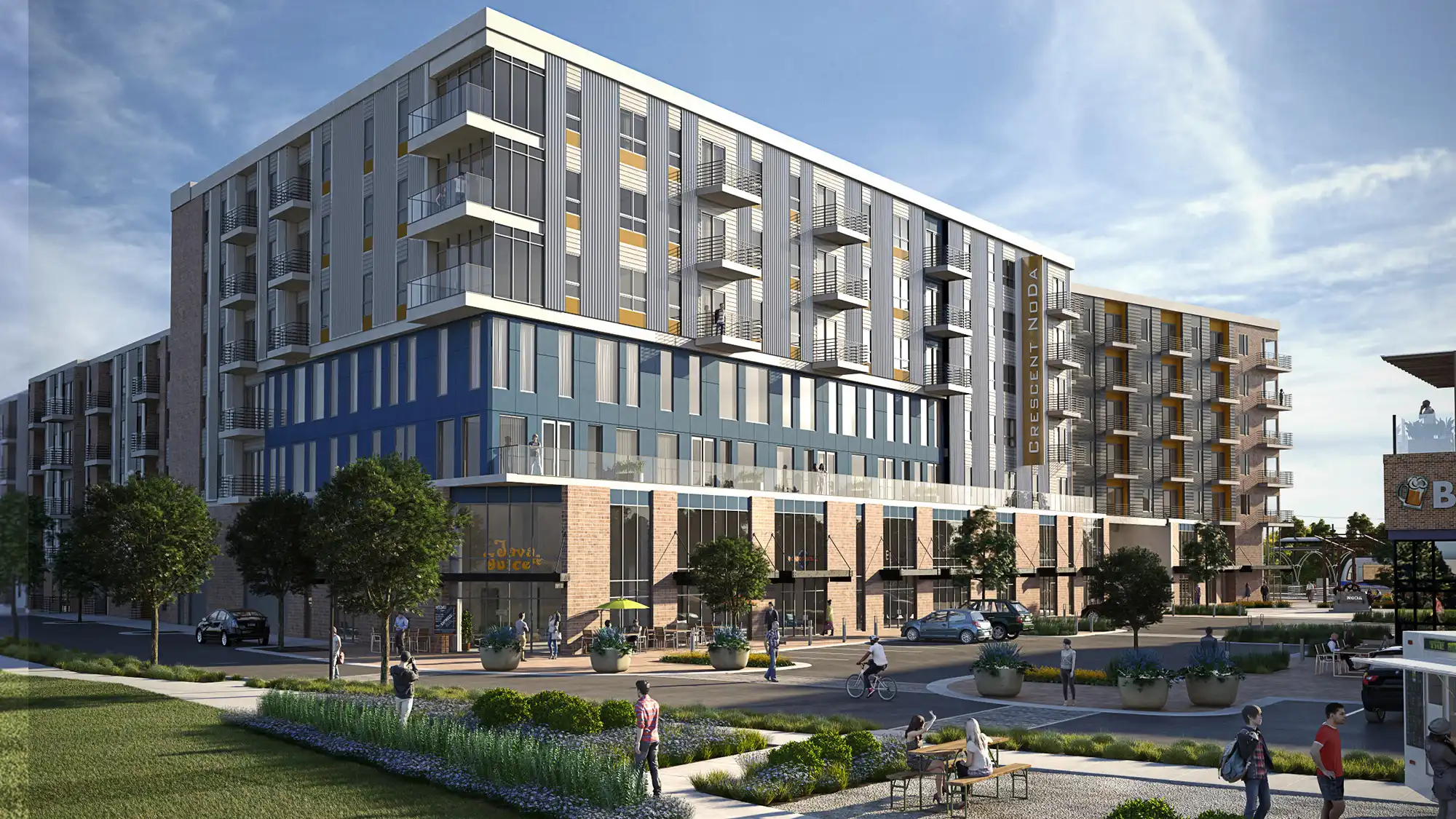
pre construction marketing renderings are architectural images used to present, market, lease, or explain a property before construction is complete. The right rendering package is not just a question of image count. It depends on the audience, the project stage, the available design information, and where the images will be used.
A sales-center hero image, an investor deck visual, a leasing brochure view, and a planning submission image can all describe the same development, but they may need different viewpoints, accuracy levels, file outputs, and review steps. The useful work is deciding what each image must do before production begins, then giving the visualization team enough reliable information to depict the project clearly.
Table of Contents
- What pre construction marketing renderings are actually for
- Choose the deliverables based on where the images will be used
- What you need to provide before commissioning the work
- How project stage and workflow affect accuracy, speed, and revisions
- When marketing renderings are not enough for planning or entitlement use
- The avoidable mistakes that create rework or limit image use later
- FAQ
- What to Do Next?
RM Design Studio
Planning a rendering project?
Talk with RM Design Studio about your project, the views you need, and your timeline.
What pre construction marketing renderings are actually for
Pre-construction marketing renderings are used when the property does not yet exist in a form that can be photographed. Developers, owners, architects, leasing teams, and marketing directors use them to explain what is being built, how it will feel, and why a prospect, tenant, buyer, investor, or reviewer should understand the proposal.
That does not mean every image should be treated the same way. A condominium presales campaign may need a warm exterior hero image, an amenity view, and unit interiors that help people imagine the arrival sequence and daily experience. The same project may also need a calmer street-context view for a municipal presentation, where massing, scale, and neighboring buildings matter more than lifestyle cues.
The first scoping question should be simple: where will the image appear, and who needs to understand it? A website hero, sales center wall graphic, investor deck, brochure spread, leasing package, signage panel, and planning board each place different demands on composition, crop, resolution, and detail. Not every project needs stills, interiors, aerials, animation, and 360 assets by default. A smaller, better-directed package often serves the campaign more clearly than a long list of disconnected views.
Choose the deliverables based on where the images will be used
Common development marketing renderings include exterior hero images, street-level pedestrian views, aerial or context views, interior amenity renderings, unit interiors, floor-plan visuals, short animations, walkthroughs, and 360 or VR assets. The right mix depends on the actual placements, not on a standard menu.
An exterior hero view is often useful for a website, brochure cover, sales deck, or launch announcement because it introduces the project quickly. A street-level view can explain arrival, storefront presence, landscaping, signage, and the pedestrian experience. An aerial context view may be more useful in an investor presentation because it shows site position, surrounding development, access, and neighborhood relationships.
Interior views should be chosen with similar restraint. A lobby rendering may help explain hospitality, arrival, or brand tone. An amenity rendering can clarify the value of a shared space. A unit interior may be important for residential presales when finishes, daylight, view direction, and furniture scale affect how the space is understood. If the project is still early and finishes are provisional, those assumptions should be named before polished images are made.
Final placement also affects output. A printed brochure may need print-ready files and room for copy. A sales center wall graphic may need a wide crop and higher resolution. A website hero may need a horizontal version plus web-optimized exports. Social posts may need alternate crops. A presentation deck may need cleaner compositions that hold up at smaller sizes. Motion or immersive formats can be useful when they solve a specific presentation problem, but still images often cover the core marketing needs with less complexity.
What you need to provide before commissioning the work
A useful rendering brief should name the audience, placements, required views, final sizes or aspect ratios, milestone dates, and the person or group with approval authority. It should also identify what is known, what is undecided, and what should not be shown as final.
Useful source material often includes plans, elevations, sections, reflected ceiling plans, RVT files, IFC files, DWG files, current BIM or CAD models, finish schedules, façade references, glazing information, material samples, furniture direction, landscape intent, lighting direction, branding references, and site or context photography. Street photography, drone imagery, adjacent-building references, topography, and neighborhood context can be especially important when the image needs to show how the project sits in its surroundings.
File type alone is not enough. An RVT, IFC, or DWG file may be helpful, but it may still contain provisional geometry, incomplete interiors, placeholder furniture, or façade details that have not been approved. The handoff should clarify the model’s level of development and which elements are reliable enough for public-facing depiction.
It is better to flag unresolved items than to let the visualization team guess. If the landscape palette, lobby finishes, balcony rails, storefront signage, or adjacent site conditions are still evolving, say so. Assumptions can be made when needed, but they should be visible to the project team before they become expensive revision points.
Review structure matters as much as source files. Pre-construction images often involve architects, developers, interiors teams, brokers, and marketing staff. If everyone sends separate comments, the revision process can become contradictory. One consolidated review channel, or one named decision-maker who gathers comments before responding, usually keeps the image direction clearer.
Free Guide
Plan Better Renderings Before Your Next Presentation
Use this quick guide to prepare clearer visual direction before project meetings, marketing reviews, or stakeholder presentations.
- Clarify the views your team needs before rendering starts
- Compare exterior, interior, and amenity visuals with more focus
- Prepare stronger notes for design, leasing, or marketing discussions
Enter your email to access the guide.
How project stage and workflow affect accuracy, speed, and revisions
Most still-image workflows move through a sequence: brief and file check, model preparation, camera studies, material and lighting direction, draft review, revisions, final rendering, and delivery. The exact timing varies with scope, input completeness, image complexity, review speed, and deliverable type.
Camera studies or clay views are useful early steps because they let the team approve the composition before time is spent on full materials, lighting, entourage, and atmosphere. A strong camera angle can answer a specific question: how the building meets the street, how the lobby is approached, how the terrace relates to the skyline, or how the unit view frames daylight and finishes.
Project stage should guide fidelity. Early concept images may focus on massing, site position, basic façade rhythm, and overall character. Later sales or leasing imagery should usually reflect confirmed materials, interior finishes, furniture scale, landscape direction, signage, and context. Starting early can support a launch calendar, but unresolved architecture, interiors, or site information can increase rework later.
The practical tradeoff is not whether early renderings are good or bad. It is whether speed or certainty is the larger risk. If presales materials are needed before all finishes are fixed, the brief can identify which items are approved and which may change. If the images will be printed, installed as signage, or widely distributed, waiting for more design certainty may reduce future replacement work.
When marketing renderings are not enough for planning or entitlement use
A marketing rendering is not automatically suitable for planning, zoning, entitlement, or municipal submission. It may be persuasive and accurate enough for a brochure, but official or public-review use can require different standards depending on the local authority and the purpose of the submission.
Planning visuals may need required viewpoints, neutral lighting, day or night conditions, verified context, specific 3D representation standards, or certain file formats. Some submissions are concerned with massing, scale, shadow, material visibility, streetscape relationships, or how the proposal is seen from defined public locations. Those needs should be confirmed before production begins.
The style difference can be significant. Marketing imagery may use atmosphere, lifestyle, selective depth of field, warm lighting, and carefully composed moments to support a launch campaign. A planning submission visual may need to be more restrained, measurable, and context-forward. Neither type is inherently better; they answer different questions.
If there is any chance an image will be used for planning or entitlement, the team should say so at the start. That allows the scope to account for mandatory viewpoints, site relationships, model accuracy, and output needs. It also helps avoid the awkward situation where a finished lifestyle image has to be rebuilt because the original camera or model was never intended for official review.
The avoidable mistakes that create rework or limit image use later
The most common mistake is commissioning images before defining the primary audience and use. A leasing package, investor deck, presales campaign, broker email, sales center display, and planning board may all need different image decisions. Without a clear priority, the rendering can become too generic to serve any one placement well.
Another mistake is sending incomplete or inconsistent drawings without identifying what is unresolved. If the floor plans, elevations, finish schedules, landscape direction, and model do not agree, the visualization team has to interpret the gaps. That may be acceptable for early concept work, but it should be understood as interpretation, not final design confirmation.
Revision management is another avoidable source of delay. Separate comments from ownership, architecture, interiors, leasing, and marketing teams can conflict with one another. A consolidated mark-up process helps the image move forward with fewer reversals.
Usage rights are also easy to overlook. Receiving image files does not automatically mean they can be reused without limits across brokers, agencies, websites, signage, press, investor decks, or municipal submissions. Permitted uses, exclusivity, assignment, sublicensing, and third-party distribution should be addressed in the contract rather than assumed after the campaign is underway.
Finally, teams sometimes assume one image package can serve every channel without planning crops and exports. A brochure spread, website header, social post, print hoarding, presentation slide, and submission board may all need different proportions. Deciding those needs early helps the views, compositions, and final files stay useful after the first deadline has passed.
FAQ
What is included in pre-construction marketing renderings for a typical development launch?
There is no single default package. A typical launch may include exterior hero images, street-context views, interior amenity renderings, unit interiors, floor-plan visuals, web crops, print files, or presentation exports. The right mix depends on audience, placement, project stage, and how much design information is confirmed.
Can a marketing rendering also be used for planning or entitlement submissions?
Sometimes, but it should not be assumed. Planning or entitlement use may require specific viewpoints, accuracy, context information, file formats, or a more neutral visual style depending on the local authority. If official use is possible, confirm those requirements before production begins.
What files should I send for a pre-construction rendering project?
Useful inputs often include plans, elevations, sections, RVT, IFC, or DWG files, finish schedules, façade references, material direction, furniture guidance, landscape intent, lighting notes, and site photography. Also explain which model elements are approved, provisional, or missing.
How early can renderings start if the design is still changing?
Renderings can often begin before every decision is final, especially for concept or early marketing use. The tradeoff is that unresolved finishes, façade details, landscaping, interiors, or context can increase interpretation and later revisions.
Do I automatically own the right to reuse renderings across brokers, websites, signage, and investor decks?
Not automatically. Reuse depends on the contract. If images may be shared with brokers, agencies, signage fabricators, press contacts, investors, or public bodies, define permitted uses, exclusivity, assignment, and sublicensing before distribution.
What to Do Next?
Start by writing a short brief before discussing image count. Name the primary audience, the intended placements, the required views, the launch or review milestones, and the final output formats. Separate must-have views from optional views so the package stays focused.
Then inventory the source information. Gather approved drawings, current model files, finish references, material direction, site photography, context images, landscape information, and any required planning viewpoints. Mark which elements are approved, provisional, or missing so assumptions do not quietly become public-facing design decisions.
Set the review process early. Identify who approves visual accuracy, who approves marketing tone, and who consolidates comments. If any image may be reused across brokers, websites, signage, investor decks, media, or official submissions, review the usage language before files are distributed.
RM Design Studio
Ready to discuss your project?
Email your project brief to RM Design Studio, or call us to discuss the renderings you need.